
Canvas Translation Loop
CONCEPT・AI WORKFLOWS

"Design owns the canvas. AI translates it. Teams collaborate through decisions, not files."
Carlos Roldan
THE PROBLEM
The reviews and approvals step is the most time-consuming part of the design process, and it's largely being overlooked. Most of the conversation in the design community right now is focused on the design-to-code workflow, which is moving faster than ever thanks to AI. But as design options accelerate, the ability to get structured, meaningful feedback from Product, Engineering, and Stakeholders has not kept pace. Unstructured comments, misaligned expectations, and repeated review cycles are still the norm.
Asking Engineers to review design work in Figma is like asking a designer to give feedback in the codebase. Asking Product or Stakeholders to engage meaningfully in either tool is even harder.
The tool was never the problem. The missing translation layer was.
THE FRAMEWORK
I created The Canvas Translation Loop (CTL) as a proof of concept to start a conversation the design community isn't really having. Please feel free to use it, improve it, and share it back.
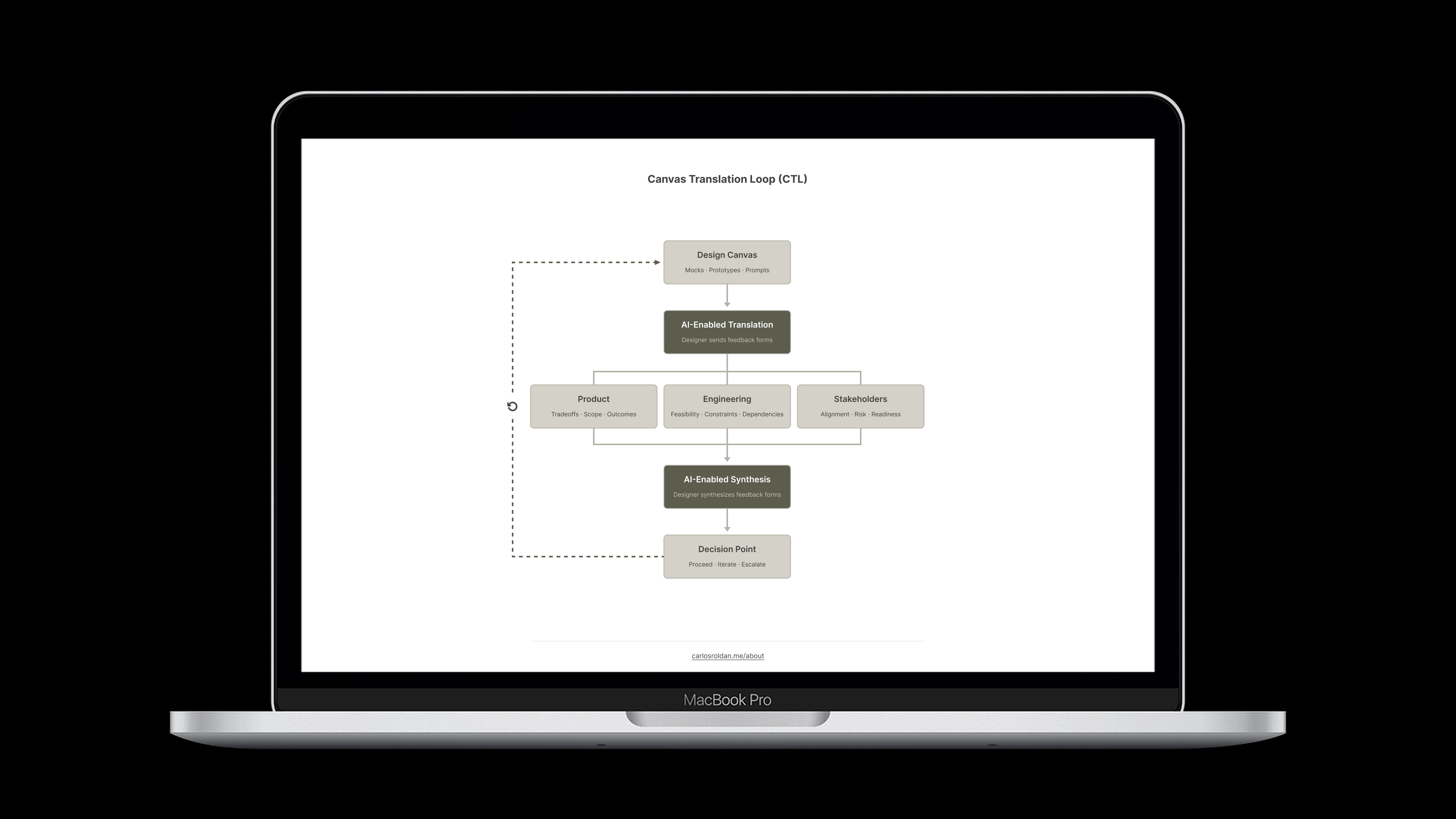
CTL is an AI-enabled workflow that starts with the design canvas and uses AI as a translation layer between Design, Product, Engineering, and Stakeholders. Synthesized decisions are documented in Jira or a comparable tool, closing the loop between design and delivery. The canvas refers to the design options under review, whether that is a mock, a prototype, or an AI-generated output from any design tool or AI assistant. CTL is tool agnostic, so it works with any design stack.
Instead of relying on Figma comments, which tend to be unstructured and out of context, CTL replaces them with role-specific views and structured async feedback through targeted forms. The result is faster alignment, fewer review cycles, and less rework without adding more meetings. Any form tool works. What matters is structured output that can be fed into AI for synthesis.
Once feedback is collected, a simple AI prompt is all it takes to synthesize responses into clear alignment, risks, and next steps. The section below includes the CTL flow diagram, sample survey questions, and an AI synthesis prompt for you to download.
REFERENCE
The following are the most commonly used forms:
Tool | Why It Works for CTL | Tier |
|---|---|---|
Microsoft Forms | Simple, structured, exports cleanly to Excel for synthesis | Included with Office 365 |
Google Forms | Fast to set up, feeds directly into Google Sheets | Free / Freemium |